> ## Documentation Index
> Fetch the complete documentation index at: https://docs.altoura.com/llms.txt
> Use this file to discover all available pages before exploring further.
# Pair Device
> Connect an HMD device like HoloLens, Meta Quest, or HTC Vive to your training session
The Pair Device feature lets you connect a head-mounted display (HMD) to your training session for an immersive experience.
 ## Supported Devices
* **Microsoft HoloLens 2**
* **Meta Quest 2 / 3 / Pro**
* **HTC Vive**
## How to Pair
Click the circular avatar icon in the top-right corner of the screen
In the dropdown menu, click **Pair Device**
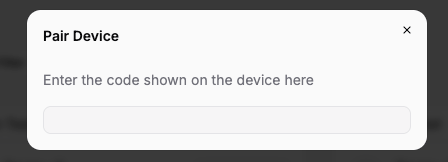
A pairing modal will appear in the Trainee App with a **120-second countdown timer**. On your HMD device, a **6-digit code** will be displayed. Enter that code into the pairing modal in the Trainee App before it expires. If the timer runs out, click **Regenerate Pin** to start a new pairing session.
Once paired, you'll see a "Pairing is Successful" confirmation. Your HMD mirrors or extends the training session.
The HMD device must be on the same network as your computer, or have internet access to connect to the Altoura cloud service. Ensure both devices are connected before starting the pairing process.
## What Changes with an HMD
Once paired, the HMD runs the training in its own Altoura app. The exact experience depends on the HMD platform:
* On the HMD, you see the 3D environment with full depth and spatial awareness
* Interaction methods depend on the device (hand tracking on HoloLens, controllers on Quest/Vive)
* Head movement controls your view on the HMD
* The web browser session on your computer links to the same training session for pairing purposes
## Troubleshooting
Codes expire after 120 seconds. Click **Regenerate Pin** in the pairing modal to get a fresh 6-digit code and try again.
Ensure the Altoura app on your HMD is updated to the latest version. Try unpairing and pairing again.
This is usually a network issue. Make sure both devices have strong, stable connections. Being on the same local network reduces latency.
## Supported Devices
* **Microsoft HoloLens 2**
* **Meta Quest 2 / 3 / Pro**
* **HTC Vive**
## How to Pair
Click the circular avatar icon in the top-right corner of the screen
In the dropdown menu, click **Pair Device**
A pairing modal will appear in the Trainee App with a **120-second countdown timer**. On your HMD device, a **6-digit code** will be displayed. Enter that code into the pairing modal in the Trainee App before it expires. If the timer runs out, click **Regenerate Pin** to start a new pairing session.
Once paired, you'll see a "Pairing is Successful" confirmation. Your HMD mirrors or extends the training session.
The HMD device must be on the same network as your computer, or have internet access to connect to the Altoura cloud service. Ensure both devices are connected before starting the pairing process.
## What Changes with an HMD
Once paired, the HMD runs the training in its own Altoura app. The exact experience depends on the HMD platform:
* On the HMD, you see the 3D environment with full depth and spatial awareness
* Interaction methods depend on the device (hand tracking on HoloLens, controllers on Quest/Vive)
* Head movement controls your view on the HMD
* The web browser session on your computer links to the same training session for pairing purposes
## Troubleshooting
Codes expire after 120 seconds. Click **Regenerate Pin** in the pairing modal to get a fresh 6-digit code and try again.
Ensure the Altoura app on your HMD is updated to the latest version. Try unpairing and pairing again.
This is usually a network issue. Make sure both devices have strong, stable connections. Being on the same local network reduces latency.