> ## Documentation Index
> Fetch the complete documentation index at: https://docs.altoura.com/llms.txt
> Use this file to discover all available pages before exploring further.
# Hand Animation Color
> The color of the guide hands that show you how to tap or grab an object.
On some steps, animated **guide hands** show you what to do: a hand taps the object, or one or two hands grab the object and move it. A Training can change the color of these guide hands, for example so they stand out against the scene.
The guide hands are **light blue** by default.
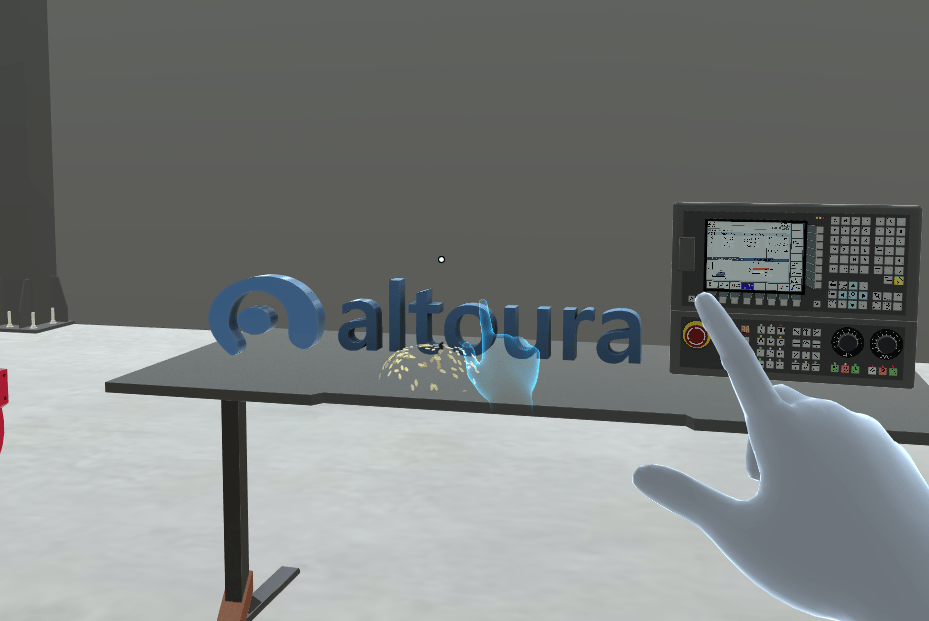
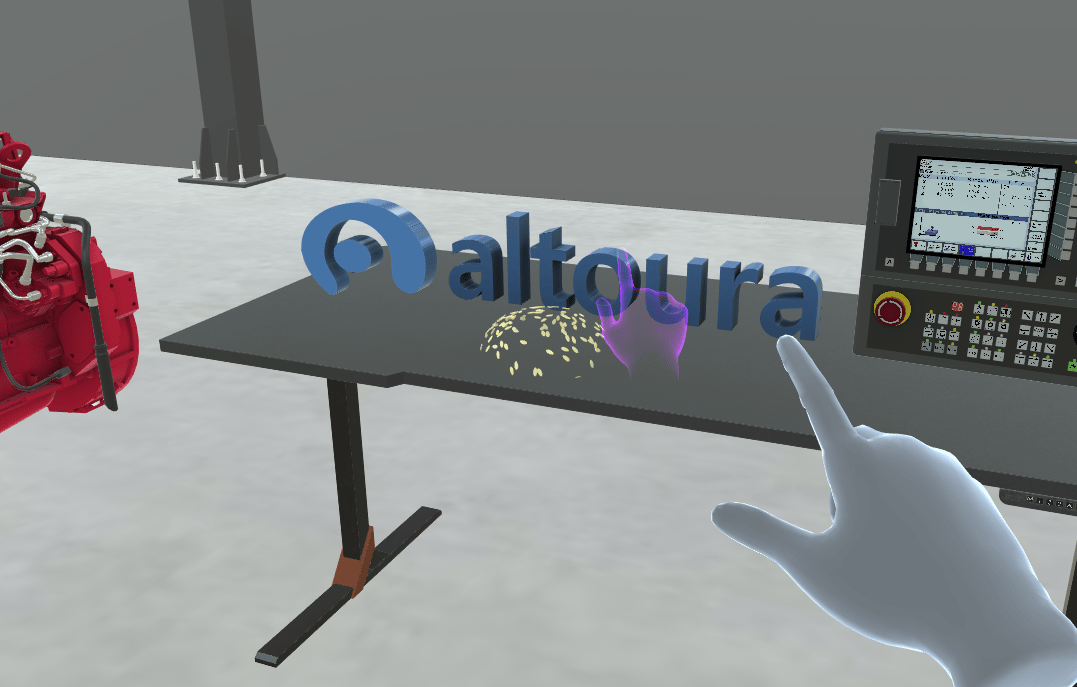 Hand Animation Color changes only the guide hands. It doesn't change your own hands. For the gloves a Training can put on your own hands, see [Hand Representation](/creator-studio/trainee-client/hand-representation).
## When You See Guide Hands
* **Tap steps:** a hand taps the object.
* **Move steps:** one or two hands grab the object and move it.
* **Rotate steps** don't use guide hands.
Not every tap or move step shows guide hands. It depends on how the step is set up. Guide hands are hidden in [Assessment mode](/creator-studio/trainee-client/assessment-mode).
## How Long the Color Lasts
Once the Training changes the color, the guide hands keep it on every later step, until the Training sets it back to light blue.
* If you go **Back**, use [Reset Step](/creator-studio/trainee-client/reset-step), use **Restart Training** or resume the Training, the guide hands use the color the Training has set at that point.
* When you close the Training, the color goes back to light blue.
***
## For Creators
To change the guide hand color in a Training, see [Set Hand Animation Color & Reset Hand Animation Color](/creator-studio/creator-app/actions/hand-animation-color).
## Related
* [Instruction Animation Color](/creator-studio/trainee-client/instruction-animation-color): the ghost that shows a move or rotation
* [Tether Line Color](/creator-studio/trainee-client/tether-line-color): the line from the step panel to the object
* [Highlighting](/creator-studio/trainee-client/highlighting): the glow on objects you need to use
This documentation is built and hosted on [Mintlify](https://mintlify.com), a developer documentation platform.
Hand Animation Color changes only the guide hands. It doesn't change your own hands. For the gloves a Training can put on your own hands, see [Hand Representation](/creator-studio/trainee-client/hand-representation).
## When You See Guide Hands
* **Tap steps:** a hand taps the object.
* **Move steps:** one or two hands grab the object and move it.
* **Rotate steps** don't use guide hands.
Not every tap or move step shows guide hands. It depends on how the step is set up. Guide hands are hidden in [Assessment mode](/creator-studio/trainee-client/assessment-mode).
## How Long the Color Lasts
Once the Training changes the color, the guide hands keep it on every later step, until the Training sets it back to light blue.
* If you go **Back**, use [Reset Step](/creator-studio/trainee-client/reset-step), use **Restart Training** or resume the Training, the guide hands use the color the Training has set at that point.
* When you close the Training, the color goes back to light blue.
***
## For Creators
To change the guide hand color in a Training, see [Set Hand Animation Color & Reset Hand Animation Color](/creator-studio/creator-app/actions/hand-animation-color).
## Related
* [Instruction Animation Color](/creator-studio/trainee-client/instruction-animation-color): the ghost that shows a move or rotation
* [Tether Line Color](/creator-studio/trainee-client/tether-line-color): the line from the step panel to the object
* [Highlighting](/creator-studio/trainee-client/highlighting): the glow on objects you need to use
This documentation is built and hosted on [Mintlify](https://mintlify.com), a developer documentation platform.