> ## Documentation Index
> Fetch the complete documentation index at: https://docs.altoura.com/llms.txt
> Use this file to discover all available pages before exploring further.

# Windows | Mac Installation

## Windows 10 PC Installation walkthrough video

[Download the Windows 10 app here.](https://portal.altoura.com/download/windows)

<iframe width="100%" height="420" src="https://www.youtube.com/embed/VtsmEVfX5tI" title="Windows 10 PC Installation" frameBorder="0" allow="accelerometer; autoplay; clipboard-write; encrypted-media; gyroscope; picture-in-picture" allowFullScreen />

## Mac Installation walkthrough video

[Download the Mac version here.](https://portal.altoura.com/download/mac)

<iframe width="100%" height="420" src="https://www.youtube.com/embed/Grpcises2kY" title="Mac Installation" frameBorder="0" allow="accelerometer; autoplay; clipboard-write; encrypted-media; gyroscope; picture-in-picture" allowFullScreen />

## Installing Altoura on Windows 10 Step-by-Step

[Download the Windows 10 app here.](https://portal.altoura.com/download/windows)

In the bottom left of your browser you may see a warning.

<img src="https://mintcdn.com/altoura-785c3552/_Fb1P96m80-mEejg/images/docs/414d5ba-71.png?fit=max&auto=format&n=_Fb1P96m80-mEejg&q=85&s=b8009a39678b4e5fe446e839d19197f8" alt="535" width="535" height="72" data-path="images/docs/414d5ba-71.png" />

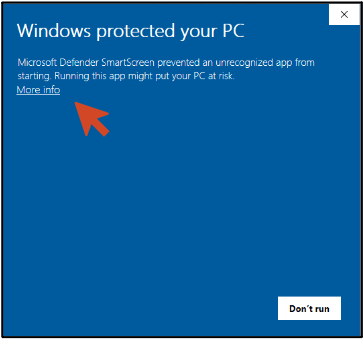
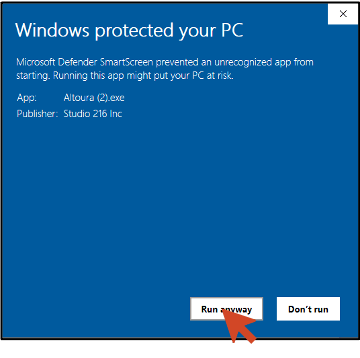
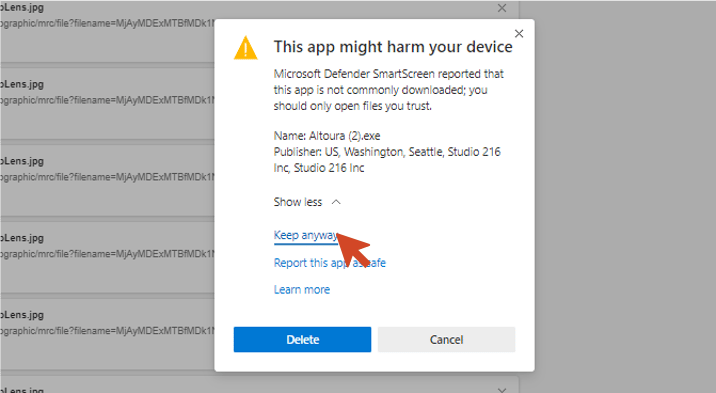
Bypass security warnings if you receive them, an example below. (Warnings will be different depending on your installed security software.
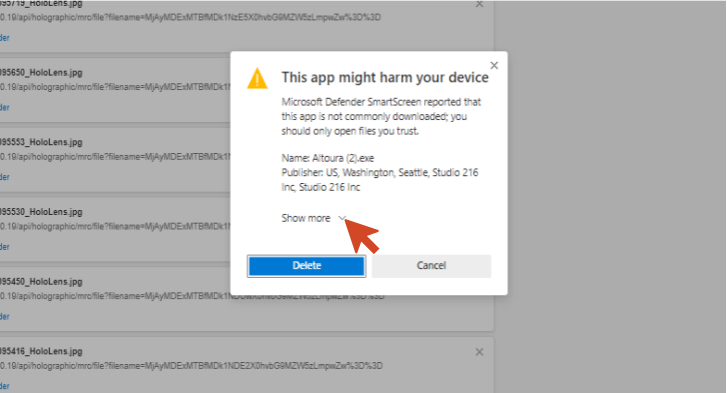
<img src="https://mintcdn.com/altoura-785c3552/niZvlZtOVSBbiV3u/images/docs/80c50ce-72.png?fit=max&auto=format&n=niZvlZtOVSBbiV3u&q=85&s=ab014e2695d1de48d37f4eed768269de" alt="727" title="72.png" width="727" height="393" data-path="images/docs/80c50ce-72.png" />

<img src="https://mintcdn.com/altoura-785c3552/z2_JFZPNE9ekTL9F/images/docs/972bb6e-73.png?fit=max&auto=format&n=z2_JFZPNE9ekTL9F&q=85&s=7838ce189ae52b9a2e26866f38451b3c" alt="716" title="73.png" width="716" height="393" data-path="images/docs/972bb6e-73.png" />

Go to where your files are downloaded.
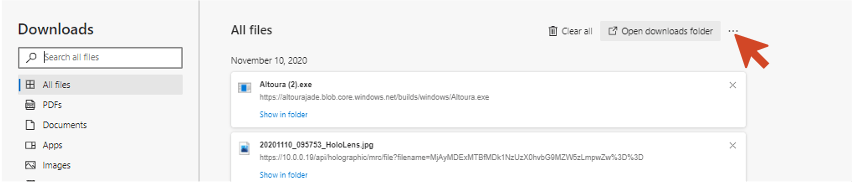
<img src="https://mintcdn.com/altoura-785c3552/niZvlZtOVSBbiV3u/images/docs/7ef4553-74.png?fit=max&auto=format&n=niZvlZtOVSBbiV3u&q=85&s=05a1efc0f9709aa74791528a6f7e962a" alt="852" width="852" height="183" data-path="images/docs/7ef4553-74.png" />

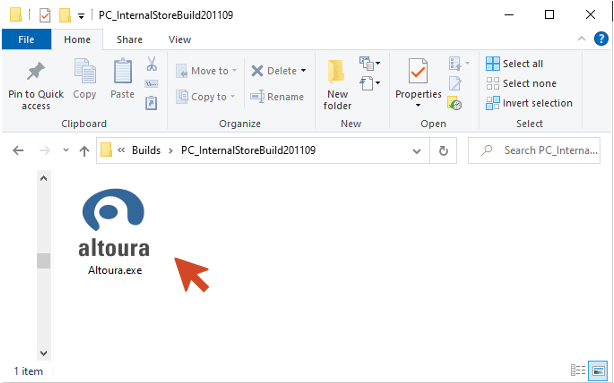
Double click on Altoura.exe to install Altoura.
<img src="https://mintcdn.com/altoura-785c3552/RIgkSrBJFuycivOX/images/docs/f02cabc-75.png?fit=max&auto=format&n=RIgkSrBJFuycivOX&q=85&s=14361311cec6056d253d18904c28accb" alt="614" width="614" height="383" data-path="images/docs/f02cabc-75.png" />

Select “More Info”

<img src="https://mintcdn.com/altoura-785c3552/uN9er-P_53ywyRvz/images/docs/e0885c4-76.png?fit=max&auto=format&n=uN9er-P_53ywyRvz&q=85&s=514d22c390e434cc31f19e60f03f95cb" alt="364" width="364" height="339" data-path="images/docs/e0885c4-76.png" />

Select “Run anyway”

<img src="https://mintcdn.com/altoura-785c3552/ZuSJMQqW-zq_BCI_/images/docs/c86f875-77.png?fit=max&auto=format&n=ZuSJMQqW-zq_BCI_&q=85&s=e99ac550796fd1c06d5043872898f2dd" alt="360" title="77.png" width="360" height="358" data-path="images/docs/c86f875-77.png" />

<img src="https://mintcdn.com/altoura-785c3552/rSHiWKFaLfV4dcN7/images/docs/6221a5b-78.png?fit=max&auto=format&n=rSHiWKFaLfV4dcN7&q=85&s=a7e9cb91a00eb0e528e098a4a65b34eb" alt="427" title="78.png" width="427" height="375" data-path="images/docs/6221a5b-78.png" />

<img src="https://mintcdn.com/altoura-785c3552/uN9er-P_53ywyRvz/images/docs/e2d48c4-79.png?fit=max&auto=format&n=uN9er-P_53ywyRvz&q=85&s=acc2bb73e351efb90881566a061746b4" alt="445" title="79.png" width="445" height="375" data-path="images/docs/e2d48c4-79.png" />

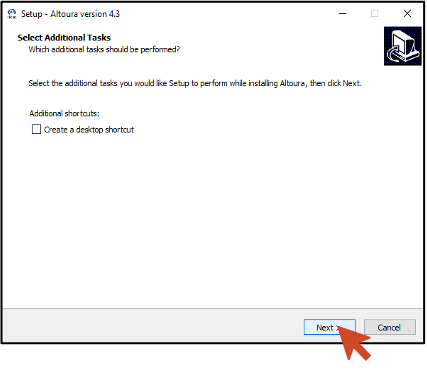
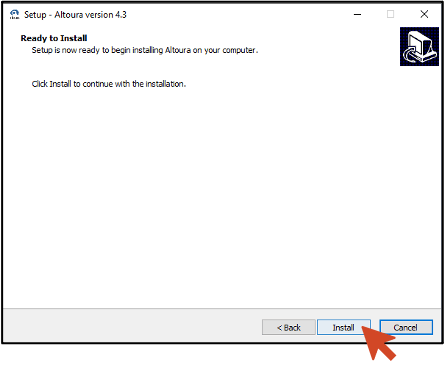
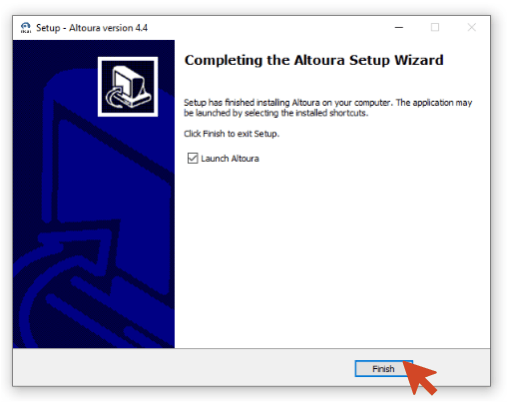
Select “Finish” and run Altoura

<img src="https://mintcdn.com/altoura-785c3552/pvN_b_9fLlPnvtUQ/images/docs/1e7df22-80.png?fit=max&auto=format&n=pvN_b_9fLlPnvtUQ&q=85&s=8bf44587bf655a784edc9b56b8aa7d23" alt="508" width="508" height="408" data-path="images/docs/1e7df22-80.png" />

Altoura will load

<img src="https://mintcdn.com/altoura-785c3552/uN9er-P_53ywyRvz/images/docs/d52aa2c-81.png?fit=max&auto=format&n=uN9er-P_53ywyRvz&q=85&s=857cb3ac4294c7ce68e79d0f6409799c" alt="656" width="656" height="370" data-path="images/docs/d52aa2c-81.png" />

***