> ## Documentation Index
> Fetch the complete documentation index at: https://docs.altoura.com/llms.txt
> Use this file to discover all available pages before exploring further.

# Navigation

## Dollhouse View

Double tap to enter with a first-person view.

*You can also rotate the Dollhouse in this view.*

<iframe width="100%" height="420" src="https://www.youtube.com/embed/ihuyCg7fRX8" title="Dollhouse View" frameBorder="0" allow="accelerometer; autoplay; clipboard-write; encrypted-media; gyroscope; picture-in-picture" allowFullScreen />

## Self-Teleport

Double tap in the 3D model to self-teleport - which will take you from first person view to real scale mode.

*This allows you to navigate to locations throughout the App.*

<iframe width="100%" height="420" src="https://www.youtube.com/embed/C8lnGpC9d0E" title="Self-Teleport" frameBorder="0" allow="accelerometer; autoplay; clipboard-write; encrypted-media; gyroscope; picture-in-picture" allowFullScreen />

## Free Look Mode

This is the default mode where, after you choose a floor, you can walk around in the model.

<iframe width="100%" height="420" src="https://www.youtube.com/embed/pokQSNjMnJU" title="Free Look Mode" frameBorder="0" allow="accelerometer; autoplay; clipboard-write; encrypted-media; gyroscope; picture-in-picture" allowFullScreen />

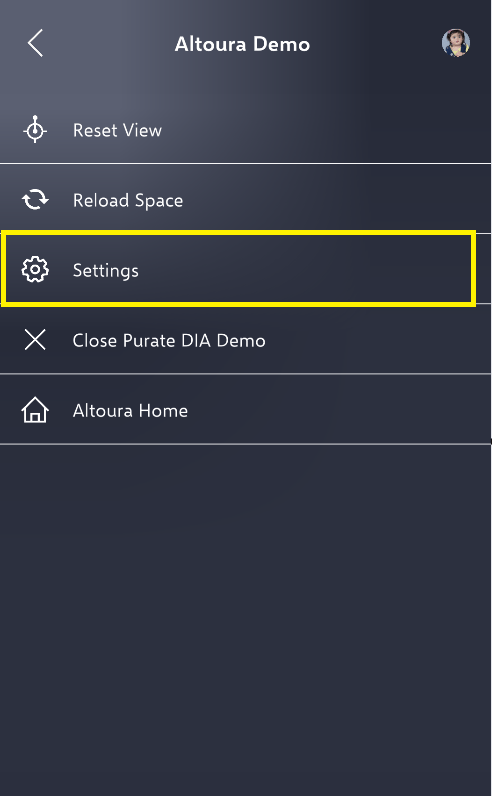
To adjust your height in the space, open the hamburger menu and select Settings

<img src="https://mintcdn.com/altoura-785c3552/niZvlZtOVSBbiV3u/images/docs/7701c28-image.png?fit=max&auto=format&n=niZvlZtOVSBbiV3u&q=85&s=77d0ea0df4c14442a276034f7ebc4ff9" alt="" width="492" height="796" data-path="images/docs/7701c28-image.png" />

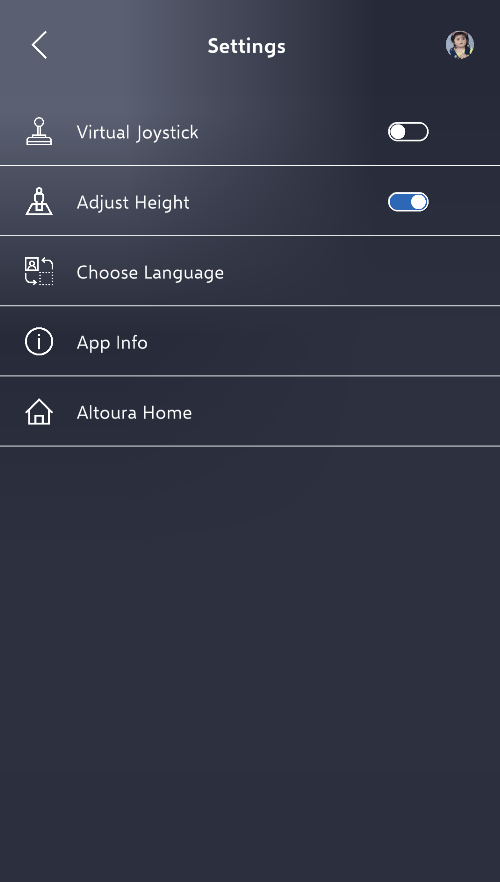
Toggle 'Adjust Height' option

<img src="https://mintcdn.com/altoura-785c3552/pvN_b_9fLlPnvtUQ/images/docs/1010805-image.png?fit=max&auto=format&n=pvN_b_9fLlPnvtUQ&q=85&s=80b3b69a93cd766e96808ac62d5f3413" alt="" width="500" height="882" data-path="images/docs/1010805-image.png" />

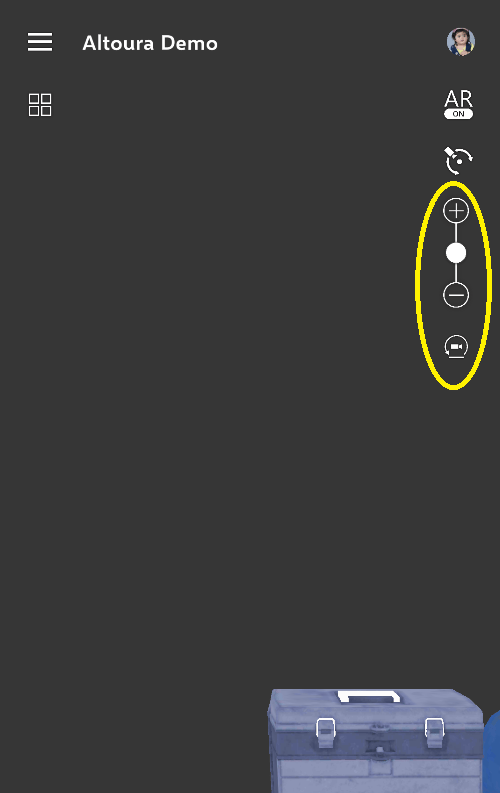
This will bring up three buttons to help adjust your view of the space.

<img src="https://mintcdn.com/altoura-785c3552/niZvlZtOVSBbiV3u/images/docs/8ea1d52-image.png?fit=max&auto=format&n=niZvlZtOVSBbiV3u&q=85&s=2869777776bb36921a69b8dd28582e8a" alt="" width="500" height="793" data-path="images/docs/8ea1d52-image.png" />

## Augment Reality Mode

Click the AR button. You can move around the space at a 1:1 scale.
<iframe width="100%" height="420" src="https://www.youtube.com/embed/geUb6WOzIJ8" title="Augmented Reality Mode" frameBorder="0" allow="accelerometer; autoplay; clipboard-write; encrypted-media; gyroscope; picture-in-picture" allowFullScreen />