> ## Documentation Index
> Fetch the complete documentation index at: https://docs.altoura.com/llms.txt
> Use this file to discover all available pages before exploring further.
# Adding and Customizing 3D Objects in an Experience
> A 3D object can be used to provide visual instructions on a step, to import other content at runtime of the Experience, and to cut down the size of the base asset bundle. A 3D Object in an Experience can be added either from a node or a connector.
## Adding 3D Objects
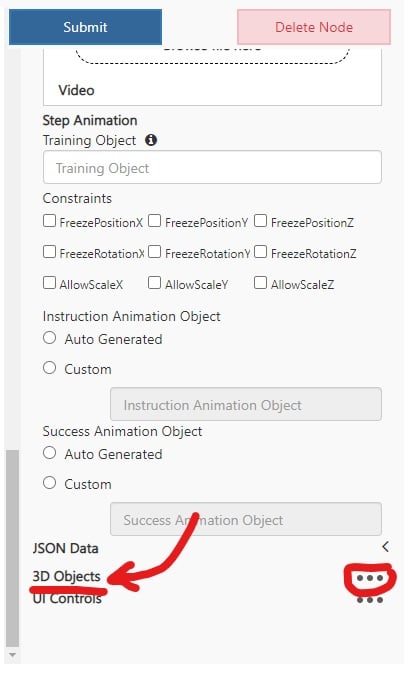
At the bottom of a node or connector there is an option to add an object from the object collection.

 ## 3D Object Customization
**ReferenceObject** – The name of a GameObject in the asset bundle with a Transform component. The position, rotation, and scale of this object is where the 3D object selected will display on this node in the experience.
* The **Transform Matrix** below is an optional offset to the position, rotation, and scale of the *ReferenceObject* transform.
**Uniqueness Suffix** - A string appended to the name of the Object that will be used in identifying the Object from others when referencing it in the Experience.
### Uniqueness Field
The Uniqueness Suffix field is only available when adding a 3D Object via the connector because the Object persists until referenced.
**RotationW** – The W value of quaternion rotation for objects ingested by a Guides integration. Not needed other than for Guides integration.
**isBillboard** – Checkbox of whether the object should always face the user.
## 3D Object Customization
**ReferenceObject** – The name of a GameObject in the asset bundle with a Transform component. The position, rotation, and scale of this object is where the 3D object selected will display on this node in the experience.
* The **Transform Matrix** below is an optional offset to the position, rotation, and scale of the *ReferenceObject* transform.
**Uniqueness Suffix** - A string appended to the name of the Object that will be used in identifying the Object from others when referencing it in the Experience.
### Uniqueness Field
The Uniqueness Suffix field is only available when adding a 3D Object via the connector because the Object persists until referenced.
**RotationW** – The W value of quaternion rotation for objects ingested by a Guides integration. Not needed other than for Guides integration.
**isBillboard** – Checkbox of whether the object should always face the user.