> ## Documentation Index
> Fetch the complete documentation index at: https://docs.altoura.com/llms.txt
> Use this file to discover all available pages before exploring further.
# Audit Logs Generation - Connectors
> When you link two nodes in the Experience Node Editor, the audit log records an Operation of Connected Node. Expanding that log entry reveals the NodeID of the target node to which the current node was linked.
 When a user selects an existing connection, adds one or more Actions in the properties pane, and clicks Save, the system:
* Creates a connector and assigns it a unique **ConnectorID**
* Logs an \*\*Operation \*\*of **Added Connector Details**
* **Modifications to** will reflect the Actions added as follows:
* 1. One Action added: the ActionName appears in the column
2. Two Actions added: both ActionNames are listed
3. More than two Actions: the column shows Multiple attributes
* When an Action on an existing connector is updated, the log records follow the same principle,
1. One Action added: the ActionName appears in the column
2. Two Actions added: both ActionNames are listed
3. More than two Actions: the column shows Multiple attributes
On expanding the audit-log row, all details of the action can be viewed.
### Adding Connectors and Connector Actions
When a user selects an existing connection, adds one or more Actions in the properties pane, and clicks Save, the system:
* Creates a connector and assigns it a unique **ConnectorID**
* Logs an \*\*Operation \*\*of **Added Connector Details**
* **Modifications to** will reflect the Actions added as follows:
* 1. One Action added: the ActionName appears in the column
2. Two Actions added: both ActionNames are listed
3. More than two Actions: the column shows Multiple attributes
* When an Action on an existing connector is updated, the log records follow the same principle,
1. One Action added: the ActionName appears in the column
2. Two Actions added: both ActionNames are listed
3. More than two Actions: the column shows Multiple attributes
On expanding the audit-log row, all details of the action can be viewed.
### Adding Connectors and Connector Actions
 ### Updating Connector Actions
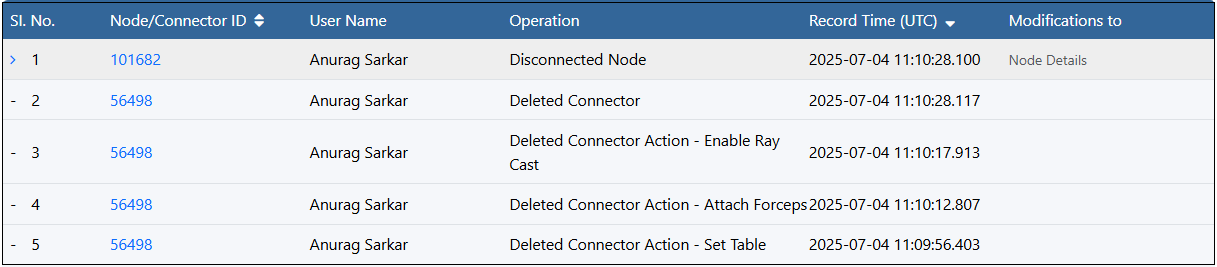
 ### Deleting Connector Actions and Connectors
* **Individual delete entries**: Every connector action deletion appears as its own audit-log row.
* **Action Deletion vs. Connector Deletion:**
* Removing a single connector action logs one “Deleted Connector Action” entry along with the instance name of the action.
* If that action was the connector’s last action, the system then logs a separate “Deleted Connector” entry.
* **Link persistence**: Deleting an action does not sever the node-to-node link—only the connector itself is removed once its final action is deleted.
* **Explicit connector removal:** Choosing Delete Connector (via the Node Editor menu or the properties pane button) immediately logs 2 entries one for “Deleted Connector” and one for the Disconnected Node.
### Deleting Connector Actions and Connectors
* **Individual delete entries**: Every connector action deletion appears as its own audit-log row.
* **Action Deletion vs. Connector Deletion:**
* Removing a single connector action logs one “Deleted Connector Action” entry along with the instance name of the action.
* If that action was the connector’s last action, the system then logs a separate “Deleted Connector” entry.
* **Link persistence**: Deleting an action does not sever the node-to-node link—only the connector itself is removed once its final action is deleted.
* **Explicit connector removal:** Choosing Delete Connector (via the Node Editor menu or the properties pane button) immediately logs 2 entries one for “Deleted Connector” and one for the Disconnected Node.