> ## Documentation Index
> Fetch the complete documentation index at: https://docs.altoura.com/llms.txt
> Use this file to discover all available pages before exploring further.
# Voice Command Reference
> Every HoloLens voice command in Altoura Frontline — universal "Select", step navigation, Follow Me, and choice options — in one lookup table.
A lookup reference for operators and authors using Altoura Frontline on the HoloLens 2. For Remote Expert session commands, see [Voice Commands in Remote Expert](/frontline/remote-expert/voice-commands).
## How Voice Targeting Works
There are two types of voice interaction on the HoloLens:
| Type | How it works |
| ----------------------------- | ------------------------------------------------------------------------------------------------------------------------------------------------------------------------------------------------------------ |
| **Universal voice selection** | Hover a control with the **hand ray** or **head-gaze cursor**, wait for the **"Say 'select'"** tooltip, then say **"Select"**. Works on every interactive control in Procedures, Remote Expert, and Profile. |
| **Global voice commands** | Dedicated phrases that trigger an action **without any hover required**. |
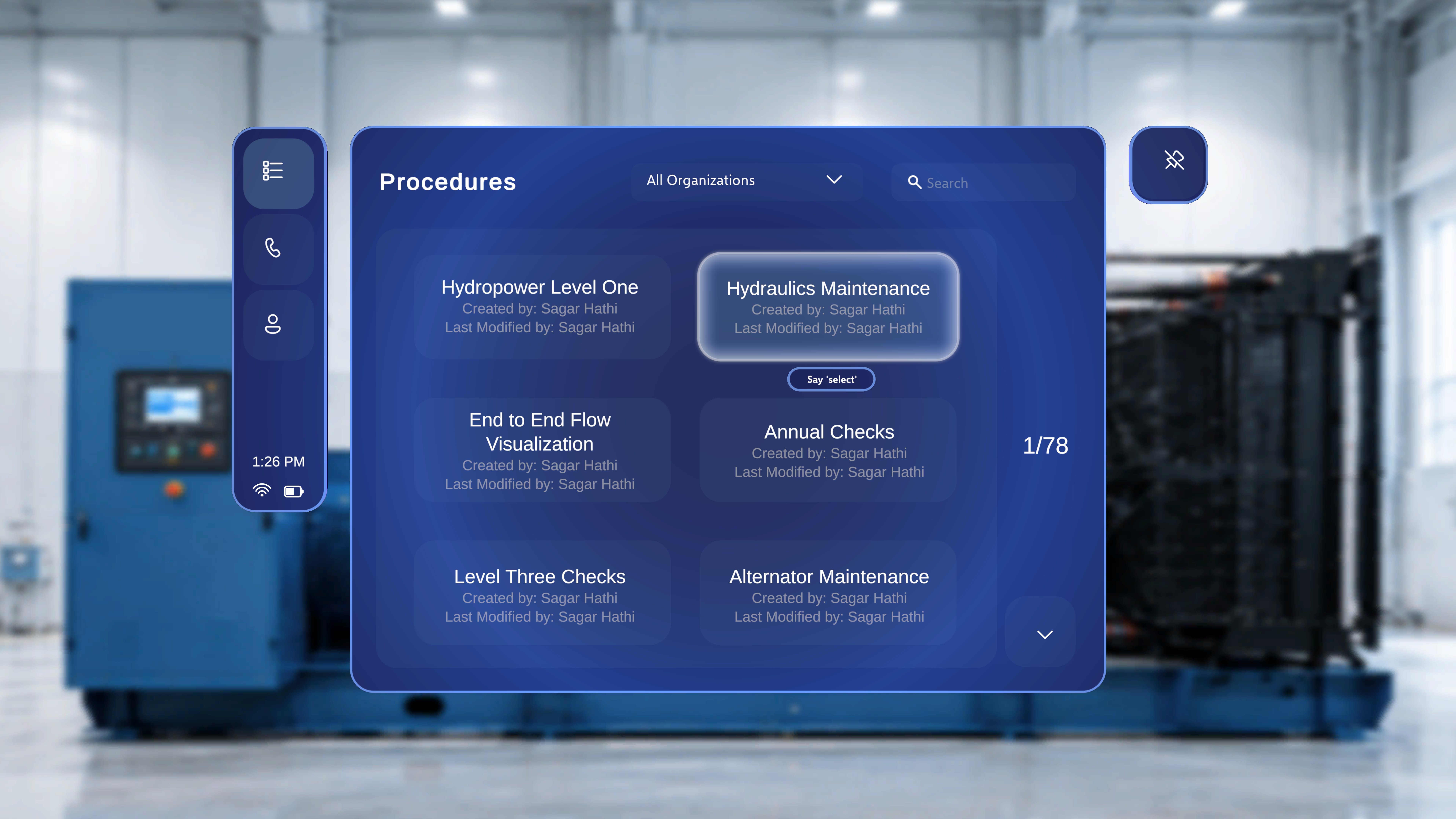 Voice commands are always available alongside standard input. Any button you can activate by voice can also be activated by air-tap or by moving close and touching the control directly. See [Gestures and Interactions](/frontline/hololens/reference/gestures-and-interactions).
***
## Global and Navigation Commands
These work anywhere in Procedures, in both Operator and Author mode. No hover is required.
| Command | Effect | Notes |
| ----------------- | ---------------------------------------------------------------------------------------------- | ------------------------------------------------------- |
| **"Follow me"** | Turns on Follow Me for the supported panel; it repositions itself in front of you as you move. | Follow Me auto-disables if you manually move the panel. |
| **"Unfollow me"** | Turns off Follow Me; the panel stays fixed where it is. | |
***
## In-Procedure Commands
| Command | Effect | Notes |
| --------------------- | ---------------------------------------------------------------- | --------------------------------------------------------------------------------------------------------------------------------------------------------------------- |
| **"Next"** | Advances the main step panel to the next step. | The only way to press Next by voice — see warning below. |
| **"Previous"** | Returns the main step panel to the previous step. | The only way to press Previous by voice — see warning below. |
| *Choice option label* | Selects that option on a Choice Step and branches the procedure. | Say the label exactly as written, e.g. saying **"Start with the alternator"** activates the option labelled *Start with the alternator*. No hover or "Select" needed. |
Voice commands are always available alongside standard input. Any button you can activate by voice can also be activated by air-tap or by moving close and touching the control directly. See [Gestures and Interactions](/frontline/hololens/reference/gestures-and-interactions).
***
## Global and Navigation Commands
These work anywhere in Procedures, in both Operator and Author mode. No hover is required.
| Command | Effect | Notes |
| ----------------- | ---------------------------------------------------------------------------------------------- | ------------------------------------------------------- |
| **"Follow me"** | Turns on Follow Me for the supported panel; it repositions itself in front of you as you move. | Follow Me auto-disables if you manually move the panel. |
| **"Unfollow me"** | Turns off Follow Me; the panel stays fixed where it is. | |
***
## In-Procedure Commands
| Command | Effect | Notes |
| --------------------- | ---------------------------------------------------------------- | --------------------------------------------------------------------------------------------------------------------------------------------------------------------- |
| **"Next"** | Advances the main step panel to the next step. | The only way to press Next by voice — see warning below. |
| **"Previous"** | Returns the main step panel to the previous step. | The only way to press Previous by voice — see warning below. |
| *Choice option label* | Selects that option on a Choice Step and branches the procedure. | Say the label exactly as written, e.g. saying **"Start with the alternator"** activates the option labelled *Start with the alternator*. No hover or "Select" needed. |
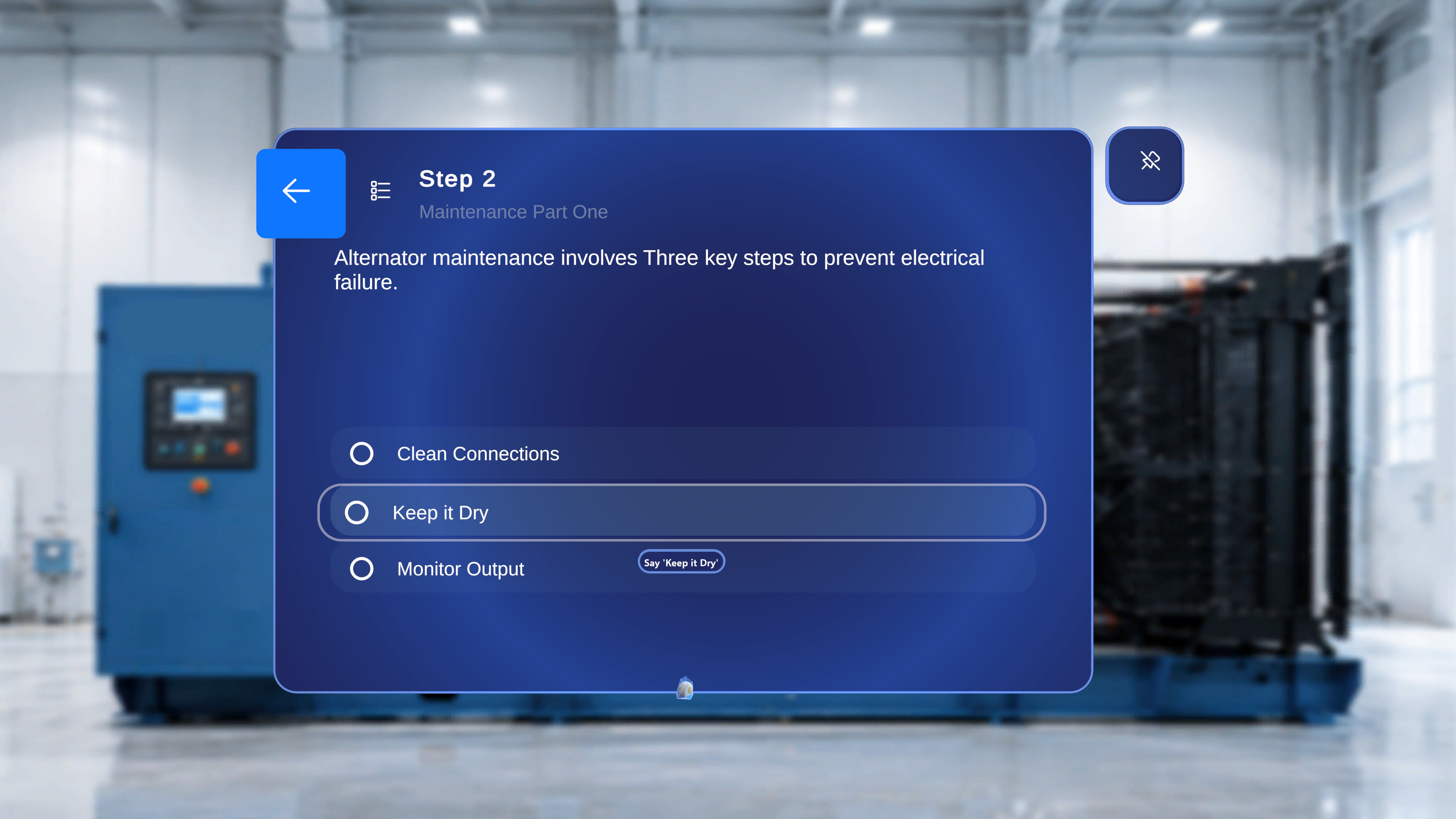 The **Next** and **Previous** arrows on the main step panel are the **only** controls that do **not** respond to hover + "Select". Use the voice commands **"Next"** and **"Previous"**, or air-tap the arrows directly. See [Follow the Steps](/frontline/hololens/operate/follow-steps).
***
## Author Mode
Author mode uses the **same command set** as Operator mode — there are no additional author-only phrases. Two author-specific notes:
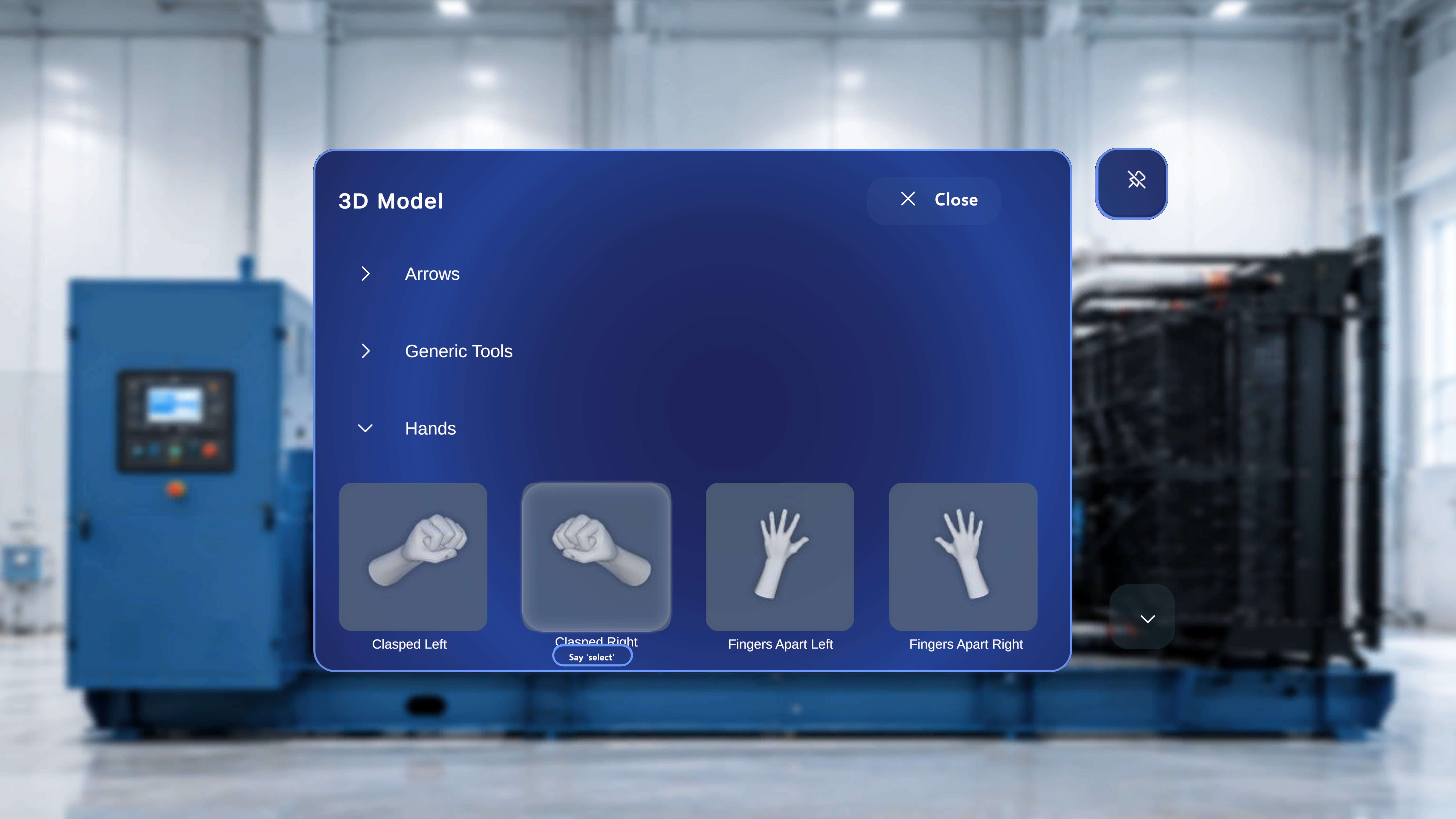
* **"Select" also works on 3D Model panel tiles.** The 3D Model panel is only shown in Author mode; hover a model tile and say "Select" to spawn it. See [Add 3D Models and Media](/frontline/hololens/author/add-3d-models-and-media).
* **Write choice labels for voice.** Choice labels are treated as literal voice phrases, so keep them short, distinct, and unambiguous when authoring — this makes hands-free selection much more reliable for operators. See [Choice Steps and Completion Rules](/frontline/hololens/author/choice-steps-and-completion-rules).
The **Next** and **Previous** arrows on the main step panel are the **only** controls that do **not** respond to hover + "Select". Use the voice commands **"Next"** and **"Previous"**, or air-tap the arrows directly. See [Follow the Steps](/frontline/hololens/operate/follow-steps).
***
## Author Mode
Author mode uses the **same command set** as Operator mode — there are no additional author-only phrases. Two author-specific notes:
* **"Select" also works on 3D Model panel tiles.** The 3D Model panel is only shown in Author mode; hover a model tile and say "Select" to spawn it. See [Add 3D Models and Media](/frontline/hololens/author/add-3d-models-and-media).
* **Write choice labels for voice.** Choice labels are treated as literal voice phrases, so keep them short, distinct, and unambiguous when authoring — this makes hands-free selection much more reliable for operators. See [Choice Steps and Completion Rules](/frontline/hololens/author/choice-steps-and-completion-rules).
 ***
## Remote Expert Session Commands
During a Remote Expert session, hover + "Select" works on every control, and two global commands toggle the spatial mesh:
| Command | Effect |
| --------------- | ------------------------------------------------------------------------------------------- |
| **"Show mesh"** | Turns the spatial mesh overlay on — a wireframe grid over surfaces the HoloLens has mapped. |
| **"Hide mesh"** | Turns the spatial mesh overlay off. |
See [Voice Commands in Remote Expert](/frontline/remote-expert/voice-commands) and the [Remote Expert Hand Menu](/frontline/remote-expert/hand-menu) for the full behaviour.
***
## Quick Reference
| Command | Requires hover? | Where it works | Mode |
| --------------------- | --------------- | ------------------------------------------------------------------------- | --------------------- |
| **"Select"** | Yes | Every interactive control **except** Next/Previous on the main step panel | All |
| **"Follow me"** | No | Any panel that supports Follow Me | Operator and Author |
| **"Unfollow me"** | No | Any panel that supports Follow Me | Operator and Author |
| **"Next"** | No | Main step panel | Operator and Author |
| **"Previous"** | No | Main step panel | Operator and Author |
| *Choice option label* | No | Choice Steps | Operator and Author |
| **"Show mesh"** | No | Spatial mesh overlay | Remote Expert session |
| **"Hide mesh"** | No | Spatial mesh overlay | Remote Expert session |
***
## Tips
* **Combine with Follow Me.** Say "Follow me" for the main step panel, then use "Next" / "Previous" hands-free while working — instructions come to you and advance on command.
* **Watch for the tooltip.** If the "Say 'select'" hint does not appear, the ray or head-gaze is not fully on the control. Adjust slightly until it shows.
* **Speak clearly.** In noisy environments, speak at a slightly slower pace and use the full command phrase.
* **Fall back to air-tap.** If a command is not recognised, use hover + "Select" or an air-tap instead.
***
## Remote Expert Session Commands
During a Remote Expert session, hover + "Select" works on every control, and two global commands toggle the spatial mesh:
| Command | Effect |
| --------------- | ------------------------------------------------------------------------------------------- |
| **"Show mesh"** | Turns the spatial mesh overlay on — a wireframe grid over surfaces the HoloLens has mapped. |
| **"Hide mesh"** | Turns the spatial mesh overlay off. |
See [Voice Commands in Remote Expert](/frontline/remote-expert/voice-commands) and the [Remote Expert Hand Menu](/frontline/remote-expert/hand-menu) for the full behaviour.
***
## Quick Reference
| Command | Requires hover? | Where it works | Mode |
| --------------------- | --------------- | ------------------------------------------------------------------------- | --------------------- |
| **"Select"** | Yes | Every interactive control **except** Next/Previous on the main step panel | All |
| **"Follow me"** | No | Any panel that supports Follow Me | Operator and Author |
| **"Unfollow me"** | No | Any panel that supports Follow Me | Operator and Author |
| **"Next"** | No | Main step panel | Operator and Author |
| **"Previous"** | No | Main step panel | Operator and Author |
| *Choice option label* | No | Choice Steps | Operator and Author |
| **"Show mesh"** | No | Spatial mesh overlay | Remote Expert session |
| **"Hide mesh"** | No | Spatial mesh overlay | Remote Expert session |
***
## Tips
* **Combine with Follow Me.** Say "Follow me" for the main step panel, then use "Next" / "Previous" hands-free while working — instructions come to you and advance on command.
* **Watch for the tooltip.** If the "Say 'select'" hint does not appear, the ray or head-gaze is not fully on the control. Adjust slightly until it shows.
* **Speak clearly.** In noisy environments, speak at a slightly slower pace and use the full command phrase.
* **Fall back to air-tap.** If a command is not recognised, use hover + "Select" or an air-tap instead.