

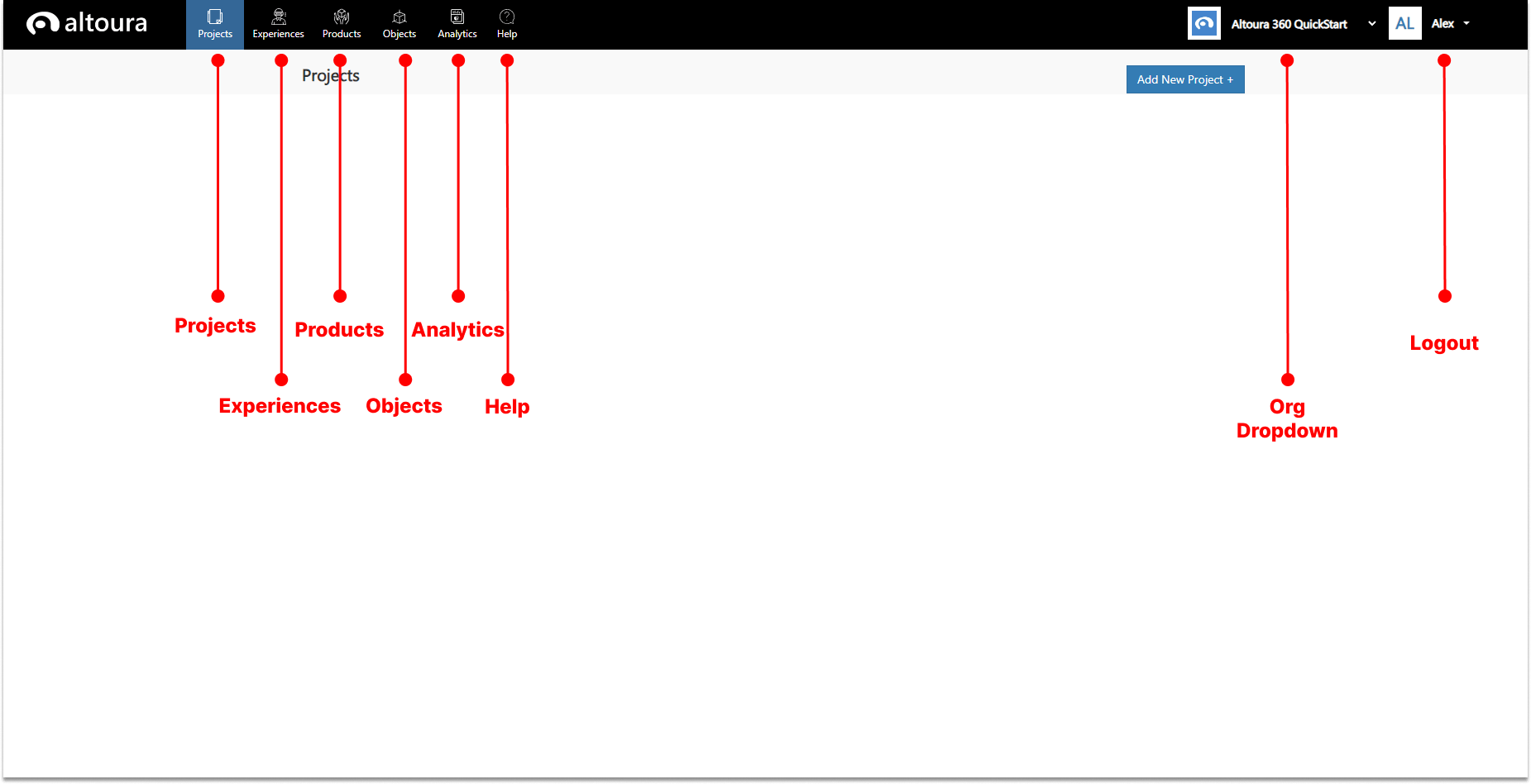
The Altoura 360 Portal, portal.altoura.com, is where users with access can log in and take advantage of many features, including building and managing Projects and Spaces, bulding and editing Experiences, managing Product IDs, uploading and editing Objects and generating and analyzing Analytics. The home screen of the Altoura Portal has a number of tabs, pictured here.

Projects tab

When selected, the Projects tab will show icons for each project in the organization that is currently selected for the logged in user. This is where you create and manage your Projects, Spaces and Sections, with all their settings and metadata.

Experiences tab

This tab will show a list of all of the Experiences that have been created for this organization. You can create, build and edit Experiences in this tab.

Products tab

This is where users get a list of all their unique product IDs, and can edit, enable or disable them.

Objects tab

The Objects tab shows a list of all the uploaded 3D content for the selected organization. Users can upload content here and edit settings and metadata for it.

Analytics tab

The Analytics tab is where users can generate reports and view the data with charts, graphs and filters by PowerBI.

Help tab

The Help tab links users to the Altoura 360 Documentation Hub, where they can search for answers to their questions.

Org dropdown

The Org dropdown gives a list of all the organizations that a user is part of. Content is filtered by organization.

Logout

This is the button used to log users out of the Portal.