

Unity Asset Bundle Browser Installation
Asset Bundles is one of the main ways to export content out of Unity and into Altoura. Follow these instructions to install the Asset Bundle Browser into your Unity project. Once you have your Asset Bundle Browser installed and updated, you are ready to start packaging up your content for Altoura.Importing the Altoura Toolkit
Altoura also provides Unity assets to help you become productive in creating your content. You can download it here:https://portal.altoura.com/download/AltouraToolkit Once downloaded, you can import the package into Unity under the Assets menu, Import package, Custom Package… and find the unity package you just downloaded.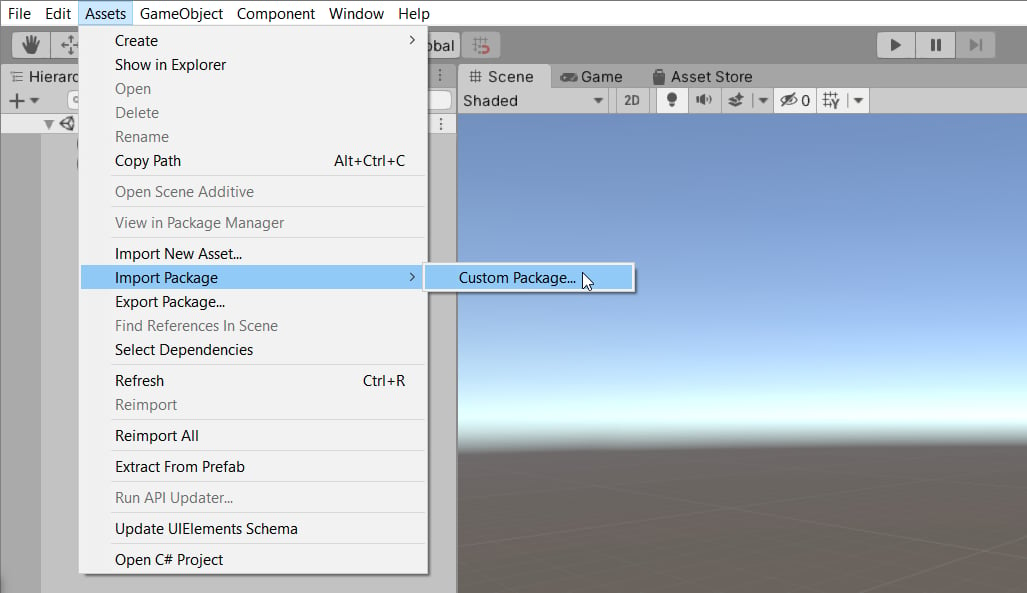
Text Mesh Pro Installation
- Update your Unity TMP version to Version 3.2.0-pre.4. To do the same follow the below steps:
- Open Unity and go to => Window => Package Manager
- Click on the dropdown next to ‘+’ button and select ‘Add package by name…’ option
- Provide Name as : com.unity.textmeshpro
- Provide Version as: 3.2.0-pre.4
- Once selected, the TMP version will be upgraded to the mentioned version