- Creates a connector and assigns it a unique ConnectorID
- Logs an **Operation **of Added Connector Details
- Modifications to will reflect the Actions added as follows:
-
- One Action added: the ActionName appears in the column
- Two Actions added: both ActionNames are listed
- More than two Actions: the column shows Multiple attributes
-
When an Action on an existing connector is updated, the log records follow the same principle,
- One Action added: the ActionName appears in the column
- Two Actions added: both ActionNames are listed
- More than two Actions: the column shows Multiple attributes
Adding Connectors and Connector Actions

Updating Connector Actions

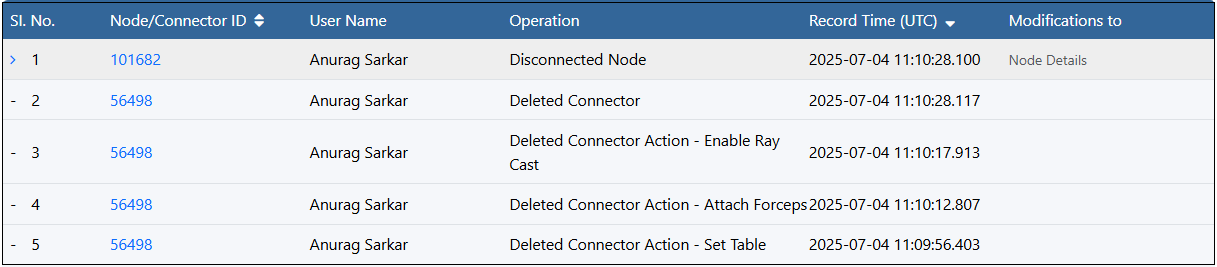
Deleting Connector Actions and Connectors
- Individual delete entries: Every connector action deletion appears as its own audit-log row.
-
Action Deletion vs. Connector Deletion:
- Removing a single connector action logs one “Deleted Connector Action” entry along with the instance name of the action.
- If that action was the connector’s last action, the system then logs a separate “Deleted Connector” entry.
- Link persistence: Deleting an action does not sever the node-to-node link—only the connector itself is removed once its final action is deleted.
- Explicit connector removal: Choosing Delete Connector (via the Node Editor menu or the properties pane button) immediately logs 2 entries one for “Deleted Connector” and one for the Disconnected Node.