New Functionality
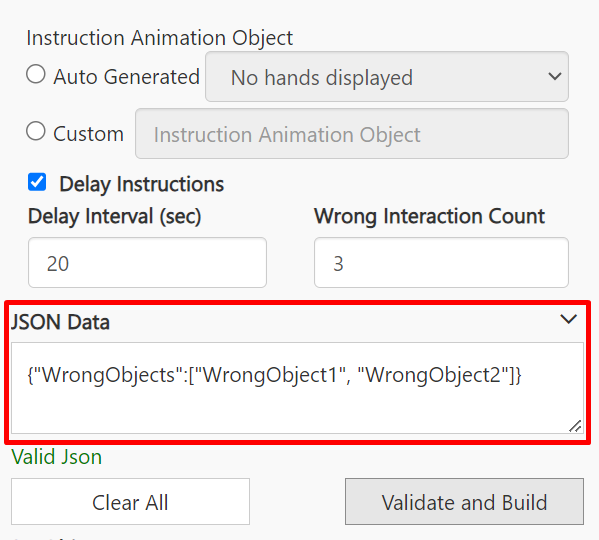
To support the evaluation of trainees, we need to consider the following factors:- Delay Interval (sec): The time elapsed before instructions are shown.
- Wrong Interaction Count: The number of incorrect attempts after which instructions are shown.
How It Works?
New Node Properties
-
Step Node Changes:
-
Three new properties are added to the step node:
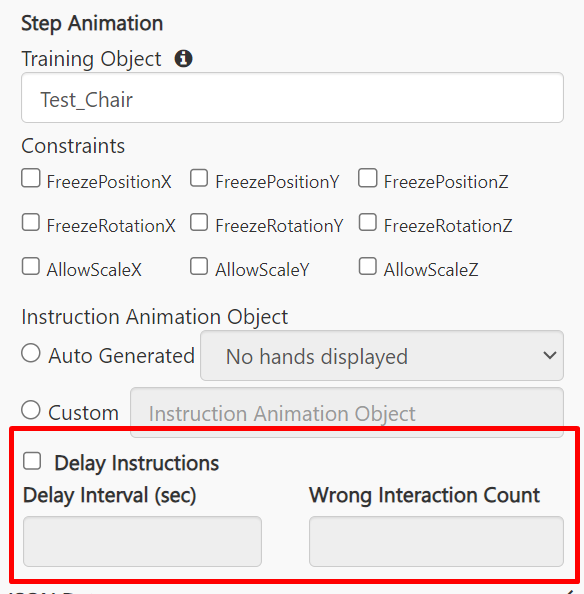
- Delay Instructions Checkbox: Marks the node as a DID step.
- Delay Interval (sec): Sets the delay time in seconds. Only whole numbers are allowed.
- Wrong Interaction Count: Sets the number of incorrect attempts before showing instructions. Instructions will be shown if no successful attempt/interaction is performed within the defined number. Only whole numbers are allowed.
-
Three new properties are added to the step node:
-
Behavior Based on Settings:
- If only the Wrong Interaction Count is set, instructions will be shown after the specified number of interactions.
- If only the Delay Interval (sec) is set, instructions will be shown once the specified time has elapsed.
- If both are set, instructions will be shown as soon as either condition is met.
- If neither of the properties are set, the Experience will continue to show the instructions as per the current behavior (no changes).
-
Correct Operation:
- If the user performs the correct operation while either of the properties is set, they will proceed to the next step without seeing the current step instructions.
-
Experience Mode:
- These changes are applicable only for the Experience of mode Practice.
- If the Experience mode is Assessment, none of these changes are applicable, and the functionality continues as it currently does.
-
Wrong Objects Configuration:
- Like in Assessment, all the training objects used in the entire Experience will be considered as WrongObjects for the DID step, except for the training object of the DID step.
- Additionally, users should be able to define a set of objects as ‘Wrong Objects’ using JSON at the node level. If any of these objects are interacted with by the user, it will be considered a wrong attempt.