

How Conditional Transitions Work
When an event occurs:- Find matching transitions: Only transitions whose event configuration matches the incoming event are considered.
- Evaluate conditions in priority order: A false condition skips that transition. The first transition whose condition is true—or whose condition is empty—is selected.
- Run the selected transition: For a transition to another step, run the current step’s On Exit actions, the transition’s Actions, and the destination step’s On Entry actions.
Setting Up a Conditional Transition
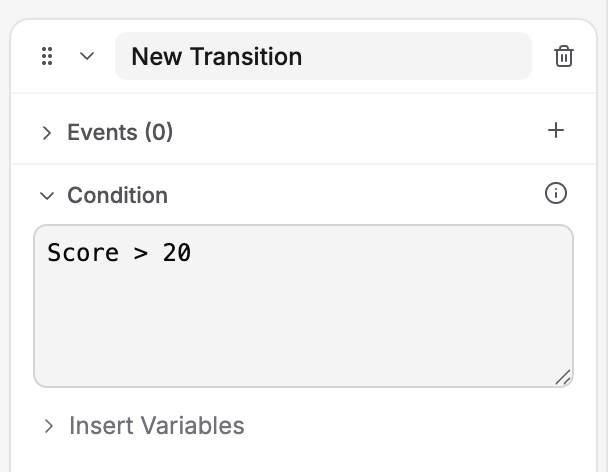
Condition field containing Score > 20, with Insert Variables below
1
Select a state and go to the Transitions tab
Click a state, then open the Transitions tab in the Properties panel.
2
Create or select a transition
Click Add Transition or expand an existing one. Each transition shows Events, Condition, Actions, and Destination Step.
3
Add an event to the transition
Click the + button next to Events to choose what triggers this transition (Tap, Move, Rotate, etc.).
4
Expand the Condition section and write your expression
Enter an AXL expression such as
Score > 20, as shown in the screenshot. This example uses a Number variable named Score that you have created in the training. Use Insert Variables to reference available variables, and match their names exactly.5
Set the Destination Step
Choose the target state from the dropdown.
6
Optional: Add transition actions
Expand the Actions section and click + to add actions that run during the transition (between onExit and onEntry).
Transition Priority: Multiple Conditions
Arrange transitions in Creator with the highest-priority path first. Reordering them sets their evaluation priority. For imported SCJSON with explicit priorities, lower numbers are evaluated first; equal priorities follow document order. Among transitions matching the event, the first transition whose condition is true or empty is selected. Other transitions are not taken for that event, even if their conditions would also be true.Selecting a Show Panel choice does not automatically assign a variable such as
selectedAnswer. For ordinary choice routing, configure each choice’s transition and destination in Show Panel. Add a condition only when that route also depends on data already recorded in the training.Unconditional Fallback Transitions
A transition with no condition still requires a matching event and must be the first eligible transition. To use it as an “else” path, give it the same event configuration as the conditional paths and place it after them. The fallback is selected only when that event occurs and no earlier matching transition qualifies. An unrelated event does not trigger it. Add a fallback when an alternative path is needed. If the trainee should remain in the step until a requirement is satisfied, leave out the fallback.Transition Actions
In addition to onEntry and onExit actions, transitions themselves can have actions — things that run during the move from one state to another. The event must match and the condition must pass before the transition is selected and its actions run. A Set Variable action on that transition cannot make its own condition pass; record the required value before the triggering event occurs. Execution order:Common Transition Actions
Example: Transition Actions
Scenario: Learner taps the correct object. Before moving to “Success” state, increment the score.- onExit of current state runs (if any)
- Transition actions run (score increases)
- onEntry of “Success State” runs (plays congratulatory audio)
Branching Example: Score-Based Paths
The trainee taps a results button in the scene to see feedback based on their recorded score.- Create a Number variable named
score. Use Set Variable actions during the assessment to record the score before the trainee reaches the results step. - In the results step, create three transitions. Configure each with a Tap event targeting the same results button object.
- Set the conditions and destination steps below, and arrange the transitions in this order.
When the trainee taps the results button:
- Score 95: The first transition is selected. Although the second condition would also be true, it is not checked after a transition is selected.
- Score 75: The first condition fails and the second passes, so the trainee goes to Good.
- Score 60: Both conditions fail, so the fallback sends the trainee to Needs Improvement.
score alone does not trigger these transitions; the configured Tap event must occur. Tapping another object does not trigger the fallback.
Complex Conditions in Transitions
Use the Altoura Expression Language (AXL) to build sophisticated conditions: Each expression below is evaluated when its transition’s configured event occurs. To provide the described alternative path, add a later transition with the same event configuration and an empty condition.Example: Time-Based Branching
Example: Multi-Variable Conditions
Example: State Tracking
Create these Boolean variables and set each totrue when its section is completed.
Testing Conditional Transitions
Before launching, test all your branches:Test each path
Test each path
Make sure every conditional transition works. Try different values for each condition.
Test boundary values
Test boundary values
If a condition is
score >= 80, test with score = 79 and score = 80 to verify the boundary.Test fallback transitions
Test fallback transitions
Trigger the configured event with values that fail the earlier conditions and verify the fallback. Also check that an unrelated event does not trigger it.
Test action execution
Test action execution
Make sure transition actions (like setting variables) actually happen. Check the resulting path or display the values in interpolated panel text after transitions.
Test complex logic
Test complex logic
If you use
&& / ||, test all combinations. For example, if the condition is (A && B) || C, test when only A is true, only B is true, only C is true, etc.Best Practices for Conditional Transitions
Order conditions from specific to general
Order conditions from specific to general
Put your most specific conditions first, then broader ones, then a fallback. This prevents unintended paths.
Provide a fallback when an alternative path is needed
Provide a fallback when an alternative path is needed
Place it after the conditional paths and use the same event configuration. Leave it out when the trainee should stay in the step until a requirement is satisfied.
Keep conditions readable
Keep conditions readable
Avoid overly complex AXL expressions. If a condition is hard to understand, break it into smaller pieces using variables.
Use meaningful variable names
Use meaningful variable names
Instead of
v1 or temp, use score, correctAnswers, isComplete. Makes conditions self-documenting.Document your branching logic
Document your branching logic
Add state descriptions or comments explaining why transitions exist and what conditions control them.
Common Mistakes to Avoid
Next Steps
Learn how to:- Use Conditions — Build the logical expressions your transitions need
- Create Variables — Store the data your conditions check
- Entry & Exit Actions — Coordinate what happens before and after transitions