

The 4 Variable Types
String
Text values (words, sentences, single letters)
Number
Numeric values (integers and decimals)
Boolean
True or false only
Array
A list of values (ordered collection)
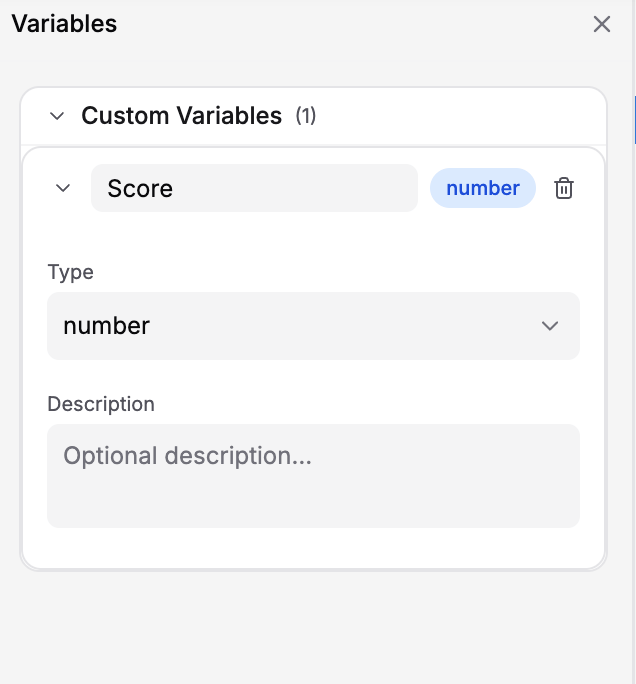
Expanded Number variable with the Type dropdown and optional Description field
score + 10, without an assignment or {{ }}.
Transition conditions must evaluate to
true for the transition to run. Choose the destination step separately from the condition. Assign any values the condition needs before the event that checks it; the same transition’s Actions run only after its condition passes.String
What it is: Text values — words, sentences, single characters, or any string of characters. Default value:"" (empty string) for a new variable. Use Set Variable to assign other text.
Examples:
"correct"(single word)"John Smith"(multiple words)"Safety-Procedure-001"(identifier with special characters)"The valve is open."(sentence)""(empty)
- Store the learner’s name, username, or email
- Store selected answers (“Option A”, “Door B”)
- Store status values (“open”, “closed”, “waiting”)
- Store IDs or codes
selectedAnswer == "Option A" as the condition and select the appropriate destination step.
Using strings in conditions:
Number
What it is: Numeric values — integers (whole numbers) or decimals (numbers with a point). Default value:0 for a new variable. Use Set Variable to assign another starting number.
Examples:
0,1,100(integers)3.14,0.5,99.99(decimals)-10(negative)
- Store scores or points
- Store attempt counts
- Store time values (in seconds or milliseconds)
- Store percentages or ratings
- Store object positions or angles
score, attempts, startTime, and elapsedSeconds. Each starts at 0. Configure Set Variable actions as follows:
now() returns a timestamp in milliseconds. Capture startTime when timing begins and keep it unchanged until the measurement is complete. Dividing the difference by 1000 gives seconds. elapsedSeconds updates whenever its Set Variable action runs.
Using numbers in conditions:
Boolean
What it is: A value that is eithertrue or false — nothing else.
Default value: false for a new variable. Use Set Variable to initialize true when required.
Examples:
true(yes, complete, open, on)false(no, incomplete, closed, off)
- Track yes/no states (is something complete? is it open?)
- Track toggles (is audio enabled? is advanced mode on?)
- Track completion of required tasks (has the inspection been completed?)
- Status flags (is this section unlocked?)
false:
For example, add this Set Variable action to the transition that records successful completion of the inspection:
Array
What it is: An ordered list of values. Access items using an index starting at0: completedSteps[0] is the first item, and completedSteps[1] is the second.
Default value: [] (empty array) for a new variable. Use Set Value with a JSON array to assign a list, or Set Expression to calculate an updated list.
Examples:
- Store a list of items (completed steps, selected choices)
- Store a history (previous scores, timestamps)
- Track multiple related values in order
["Identify valve"]. Add each task only once when using the list length as a count of distinct completed tasks.
Use len(completedSteps) >= 3 as a condition to check whether at least three tasks have been recorded. For a training with five tasks, display progress in a Show Text or Show Panel Body:
Choosing the Right Type: Quick Reference
Use this table to decide which type to use:Type Compatibility
Use matching types when comparing values and assigning a result with Set Variable. A Number variable requires a numeric result, a Boolean requirestrue or false, and an Array requires an array.
+ operator adds numbers or joins text. The == operator can compare different types by converting them during comparison; === also requires matching types:
len() returns the length of a string or array. clamp() requires numeric arguments and constrains a number. Neither function converts numeric text into a number. Choose Number variables and numeric values for arithmetic.
Starting Values
Creator assigns these defaults to new variables automatically:
The Variables pane does not expose an editable Default Value field. For another starting value, add a Set Variable action in the starting step before actions that read it. For example, create a Number variable
passingScore, then select it in Set Variable and use Set Value to enter 80.
Changing a variable’s Type resets its default to the new type’s default. Review actions and conditions that use the variable after a type change. Existing stored defaults are preserved when the type stays the same.
Best Practices
Pick the right type from the start
Pick the right type from the start
Changing types later can break conditions and actions. Plan ahead.
Use simple types when possible
Use simple types when possible
Strings, numbers, and booleans are easier to work with than arrays. Use them unless you really need a list.
For lists, use arrays
For lists, use arrays
Instead of
answer1, answer2, answer3, use one selectedAnswers array.Initialize values before using them
Initialize values before using them
Review the automatic defaults and use Set Variable for other starting values. Initialize each value before actions or events that depend on it.
Next Steps
Learn about:- Creating Variables — Create variables in your training
- Variable Interpolation — Use variables in text
- Conditions — Use variables to control training flow