Step 4: Create an Asset Bundle with Altoura Prefabs
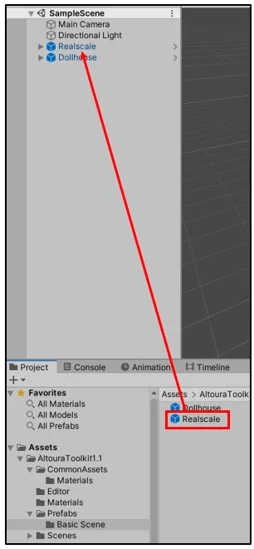
In order to create Asset Bundles there are two Altoura Unity Toolkit Prefabs that you must drag into your scene: 1) Dollhouse and 2) Realscale. A Unity Prefab is a collection of Game Objects and 3D Content that is saved within the Unity Project for reuse.
Ensure colliders against all Training objects and Success Colliders are disabled.
Within the ‘Projects’ folder, expand ‘Assets’, expand ‘AltouraToolkit1.2’, expand ‘Prefabs’, then select the folder ‘Basic Scene’. Drag the Realscale and Dollhouse prefabs into your scene. NOTE: Do not rename the prefabs.
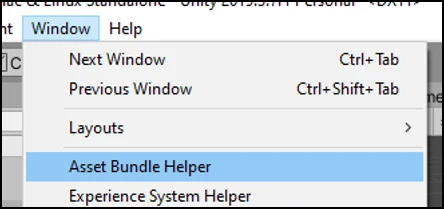
You can now create an Asset Bundle for upload into an Altoura Portal Project. Select ‘Window’ in the top menu, then ‘Asset Bundle Helper’.
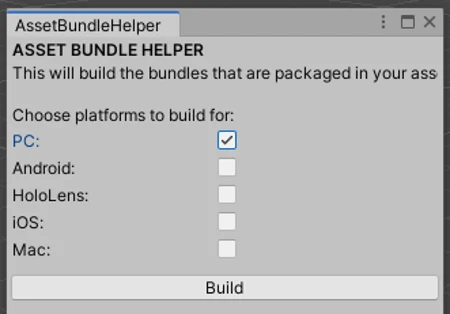
Check ‘PC’ (or Mac) as the build option, then select ‘Build’.
NOTE: The Asset Bundle Helper will place the Asset Bundle under the Asset Folder within your Unity Project Files folder: "c:\Altoura\Hello World Tutorial\Altoura Hello World\Assets\AssetBundles". You will later need to reference when uploading into your Altoura Portal Project.